The Ultimate Guide to Cleaning Up Your Computer: Essential Apps and Tips
A comprehensive guide to the best apps and tools for decluttering and optimizing your computer, featuring expert recommendations and step-by-step instructions. Learn how to free up storage, improve performance, and maintain a clean digital workspace.

This week, we dive into the essential tools and techniques for cleaning up your computer, a task that can dramatically improve performance and free up valuable storage space. Whether you're a Mac or Windows user, there are powerful apps designed to scan for junk files, duplicate documents, and unused applications that clutter your system. Our guide highlights the most effective solutions, from built-in utilities to third-party software, ensuring your machine runs like new.
For Mac users, CleanMyMac X remains a top choice, offering a comprehensive suite of tools that remove system junk, malware, and large old files. It also includes a maintenance module that runs scripts to optimize system performance. Windows users can turn to CCleaner, which similarly cleans temporary files, browser caches, and registry issues. Both apps provide intuitive interfaces and one-click cleanup options, making them accessible even for beginners.
Beyond these all-in-one tools, specialized apps target specific problem areas. Gemini 2 for Mac is excellent for finding and deleting duplicate files, while Duplicate Cleaner for Windows offers similar functionality. For those struggling with large files, DaisyDisk (Mac) and WinDirStat (Windows) visualize disk usage, helping you identify space hogs at a glance. These tools are particularly useful for photographers, video editors, or anyone with a large media library.
Context is key: many users accumulate gigabytes of temporary files, caches, and logs that applications never clean up. Operating systems themselves generate update files and previous system versions that can be safely removed. For instance, macOS's storage management tool can delete iOS backups, old messages, and cache files, while Windows' Storage Sense automates the removal of temporary files and empty the recycle bin. Combining these built-in features with third-party apps yields the best results.
User impact is significant: a clean computer boots faster, apps launch quicker, and you gain back precious storage space for important files. These tools are available for all major platforms, with many offering free versions or trials. Paid versions typically add advanced features like scheduled cleanups, real-time monitoring, and malware removal. Prices range from $20 to $50 for a one-year license, though some apps offer lifetime purchases.
For those on a budget, free alternatives like BleachBit (cross-platform) or Onyx (Mac) provide robust cleaning options without cost. However, they require more manual intervention and lack the polish of paid apps. It's also worth noting that over-cleaning can be detrimental; avoid deleting system files or caches that applications actively use. Always review what you're removing, especially with registry cleaners.
Looking ahead, we expect more integration of AI to intelligently recommend which files to delete based on usage patterns. Apple and Microsoft are already incorporating smarter storage management in their latest OS updates. Until then, a regular cleaning schedule—monthly for light users, weekly for heavy ones—will keep your computer in top shape. Start with a trusted app and gradually explore additional tools as needed.
Osaurus Mac App Merges Local and Cloud AI for Enhanced Privacy and Performance
Osaurus is a new Mac application that integrates both local and cloud AI models, allowing users to keep their memory, files, and tools on their own hardware for improved privacy and performance. The app aims to provide a seamless AI experience by intelligently routing tasks to the most appropriate model.
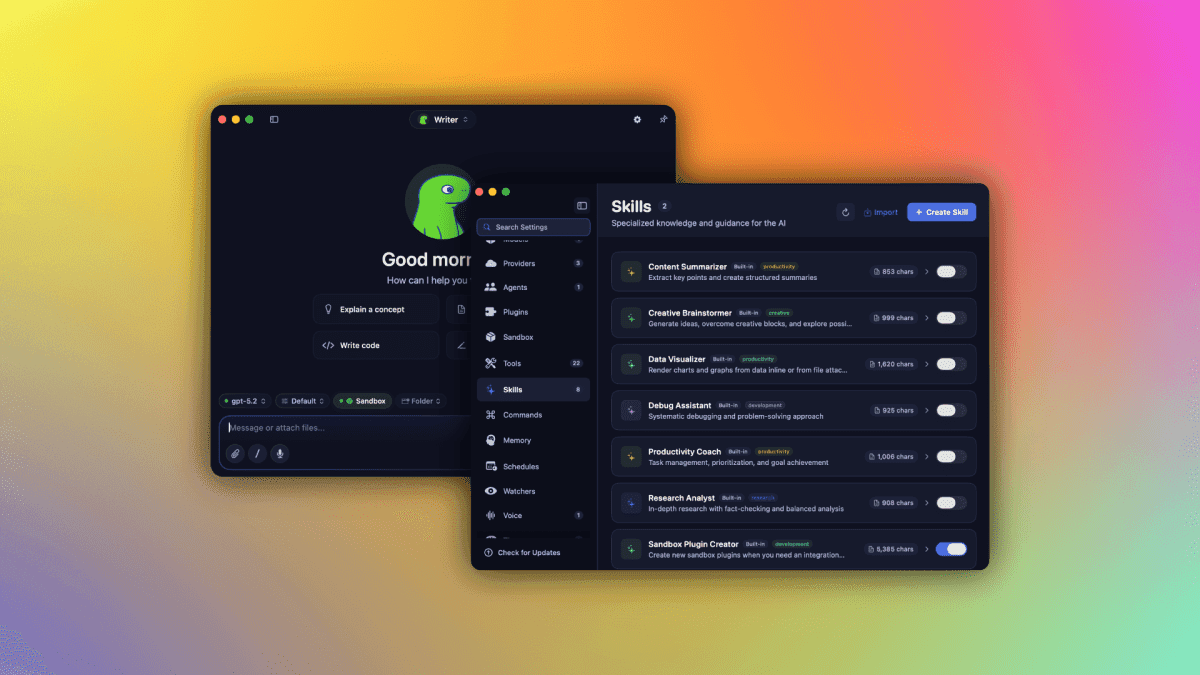
A new Mac application called Osaurus is set to revolutionize how users interact with artificial intelligence by combining local and cloud-based AI models into a single, cohesive interface. The app, which launched today, prioritizes user privacy by ensuring that personal data such as memory, files, and tools remain stored on the user's own hardware. This hybrid approach allows Osaurus to leverage the strengths of both local and cloud AI, offering fast response times for simple tasks while tapping into the vast computational power of the cloud for more complex operations.
Osaurus works by intelligently routing user requests to either a local AI model or a cloud-based one, depending on the task's requirements. For instance, basic queries like setting reminders or searching through local files are handled by the on-device model, ensuring quick and private processing. More demanding tasks, such as generating detailed reports or analyzing large datasets, are sent to cloud AI services like OpenAI's GPT-4 or Anthropic's Claude, providing advanced capabilities without compromising performance.
The app's architecture is designed to be extensible, supporting a variety of local models that users can download and run directly on their Mac. This includes models optimized for Apple Silicon, taking advantage of the Neural Engine for efficient inference. On the cloud side, Osaurus integrates with multiple providers, allowing users to choose their preferred service or even use their own API keys for a customized experience.
Osaurus aims to address a growing concern among users about data privacy in the age of AI. By keeping sensitive information on-device, the app reduces the risk of data breaches and unauthorized access. This is particularly important for professionals handling confidential documents or personal data. Additionally, the local-first approach ensures that the app remains functional even without an internet connection, providing reliability in offline scenarios.
The app's use cases are diverse, ranging from personal productivity to creative work. Users can ask Osaurus to summarize documents, draft emails, generate code snippets, or even brainstorm ideas. The app also features a persistent memory system that learns from user interactions, allowing it to provide more personalized and context-aware responses over time. This memory is stored locally, ensuring that the AI's learning remains private.
Currently, Osaurus is available exclusively for macOS, with compatibility for both Intel and Apple Silicon Macs. The app is free to download, but users who wish to access cloud AI models will need to provide their own API keys or subscribe to a premium plan that includes cloud credits. The premium plan starts at $9.99 per month, offering a set number of cloud queries and priority support.
While Osaurus offers a compelling solution for Mac users, there are still some unknowns. The app's performance with large local models may vary depending on the Mac's hardware, and the cloud integration relies on third-party services that may have their own usage limits and pricing. Future updates are expected to include support for Windows and Linux, as well as additional AI models and integrations. The developers have also hinted at a potential mobile version, though no timeline has been announced.
X Launches History Tab for Bookmarks, Likes, Videos, and Articles
X introduces a new History tab that consolidates bookmarks, likes, watched videos, and read articles into one location. The feature aims to make the app a more convenient save-it-for-later tool.
X has launched a new History tab that brings together bookmarks, likes, watched videos, and read articles in a single place. The feature is rolling out now on both mobile and web versions of the platform.
Instead of having to jump between different sections to find saved content, users can now access everything from one unified timeline. The History tab automatically logs posts you’ve interacted with, including those you’ve liked, bookmarked, or spent time watching or reading.
For example, if you come across an interesting thread but don’t have time to finish it, you can simply like it and find it later under History. Similarly, any video you watch for more than a few seconds or any article you open will be recorded there.
The tab is accessible from the main navigation menu. It organizes content in reverse chronological order, making it easy to pick up where you left off. Users can also filter by type—bookmarks, likes, videos, or articles—to narrow down the list.
This move expands X’s role as a save-it-for-later tool, competing with services like Pocket or Readwise. It also encourages more engagement by making it easier to revisit content without actively bookmarking it.
The History tab is available starting today for all X users on iOS, Android, and the web. No additional settings or updates are required—it should appear automatically in the navigation bar.